Why Cold Emails Go to Spam Even When SPF, DKIM, and DMARC Are Correct
Updated: 19 Nov 2026
36
You’ve configured SPF, DKIM, and DMARC. Your email accounts are connected, and your outreach campaign is ready.
You send a few test emails, expecting everything to work.
But some messages still land in spam.
This is one of the most frustrating situations in cold email outreach, especially when the technical setup appears correct.
The problem is that email authentication and inbox placement are two different things.
I’ve worked on email infrastructure using Google Workspace, Microsoft 365, Cloudflare, SMTP2GO, and outreach platforms such as PlusVibe.
One important lesson from this work is that passing authentication checks doesn’t guarantee successful inbox delivery.
Let’s look at why this happens and what you can investigate.
1. Authentication Is Only the First Step
SPF, DKIM, and DMARC help receiving email systems determine whether messages are authorized and properly authenticated.
SPF identifies the servers permitted to send on behalf of a domain.
DKIM uses digital signatures to help verify message integrity and domain association.
DMARC evaluates alignment and provides policy instructions for messages that fail its checks.
These records are essential, but they don’t tell Gmail or Microsoft whether recipients actually want your emails.
An authenticated message can still be unwanted.
For example, a perfectly authenticated campaign sent to thousands of irrelevant contacts may generate complaints, unsubscribes, and negative engagement.
Receiving systems can consider these signals when making filtering decisions.
That’s why deliverability requires more than DNS configuration.
2. Domain Reputation Matters
Your sending domain develops a reputation based on different signals over time.
These may include historical sending patterns, authentication results, spam complaints, and how recipients interact with messages.
If you suddenly increase sending activity, receiving systems may treat that change cautiously.
The same issue can occur when a domain is used for outreach without sufficient preparation or ongoing monitoring.
A new domain isn’t automatically trusted simply because it has never sent spam.
It has little or no established sending history.
I prefer gradually introducing legitimate sending activity and watching for problems rather than immediately pushing high volumes.
This also makes it easier to identify issues before they affect an entire campaign.
3. Sending IP Reputation Can Affect Delivery
Domains aren’t the only part of the sending infrastructure that matters.
The sending IP address can also influence filtering decisions.
This is especially relevant when working with SMTP providers.
I’ve used SMTP2GO with a dedicated IP for email infrastructure testing and sending.
A dedicated IP provides more control over the reputation associated with that IP, but it also means you’re responsible for maintaining appropriate sending practices.
It isn’t an automatic solution to spam placement.
A dedicated IP with poor sending behavior can perform worse than a properly managed shared IP.
When diagnosing problems, I look at both domain-related and IP-related factors instead of assuming that one change will fix everything.
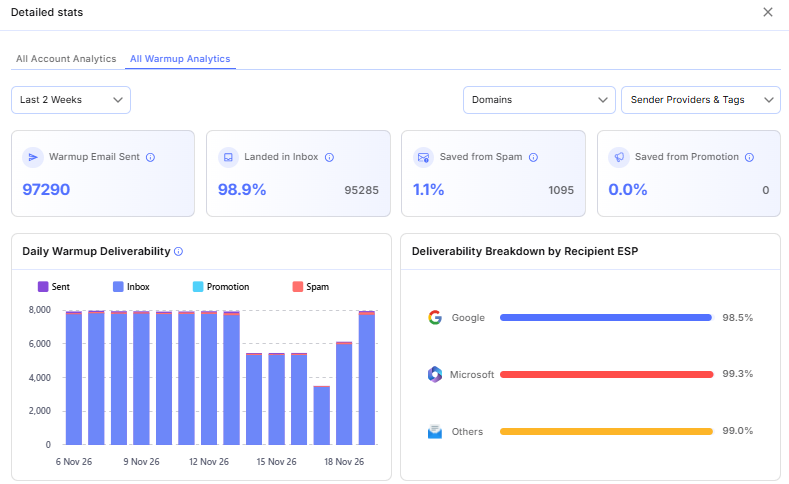
4. Warmup Scores Don’t Guarantee Inbox Placement
Warmup tools are commonly used in cold outreach.
They can help monitor mailbox activity and provide signals about the condition of sending accounts.
However, it’s important to understand their limitations.
A high warmup score doesn’t prove that every real prospect will receive your emails in the primary inbox.
Actual campaigns have different recipients, content, links, and engagement patterns.
That means results can vary significantly.
When using PlusVibe as part of an outreach workflow, I would treat warmup information as one piece of the monitoring process.
It should be combined with actual campaign data and independent deliverability testing.
5. Poor Prospect Data Creates Problems
One of the most overlooked causes of deliverability trouble is the prospect list.
Imagine sending 5,000 emails to contacts collected from outdated databases.
Some addresses may no longer exist.
Others might belong to people who changed companies or roles.
Even valid addresses may be poor targets for your offer.
This creates several problems.
Invalid addresses increase delivery failures.
Irrelevant messages can lead to complaints or unsubscribes.
Poor targeting can also reduce meaningful replies.
Before launching a campaign, I prefer verifying email addresses and reviewing whether the prospects actually match the intended audience.
Tools such as Reoon can help with email verification, although verification cannot guarantee that every address will accept delivery.
List quality should be reviewed continuously, not only when a campaign begins.
6. Email Content Can Trigger Filtering
Your email content also matters.
Messages containing misleading claims, suspicious links, excessive formatting, or irrelevant offers may be treated less favorably.
A message doesn’t have to contain obvious spam phrases to be unwanted.
For example, sending a generic sales pitch to someone who has no connection to the product can create negative engagement even when the wording is technically acceptable.
I prefer short, clear emails that explain why the recipient is being contacted.
A useful message should communicate the reason for reaching out, the potential relevance, and a straightforward next step.
Personalization should be accurate rather than artificial.
Mentioning incorrect company details can make an email appear less trustworthy.
7. Use Testing Tools to Investigate Problems
When emails start landing in spam, guessing isn’t particularly useful.
I prefer collecting evidence.
Mail-Tester can help identify authentication and message configuration issues.
GlockApps can provide inbox placement testing across supported receiving environments.
Provider logs may reveal delivery errors, rejections, and other technical problems.
These tools answer different questions, so their results should be considered together.
For example, if authentication passes but placement testing is poor, investigate reputation, sending patterns, and message content.
If messages are rejected, review the specific SMTP error responses.
If delivery appears normal but replies are weak, investigate targeting and the offer before blaming the infrastructure.
8. Monitor Results Inside Your Outreach Platform
Once a campaign is active, you need a consistent way to review performance.
PlusVibe can be part of this process by providing a place to manage outreach campaigns and review campaign activity.
Look for unusual changes in sending behavior, errors, and replies.
Avoid making major decisions based on a single day’s results.
Campaign performance can fluctuate for several reasons.
Instead, compare patterns over a reasonable period and investigate meaningful changes.
Final Thoughts
Passing SPF, DKIM, and DMARC checks is necessary, but it isn’t the same as achieving reliable inbox placement.
Deliverability depends on multiple factors working together.
Domain reputation, IP reputation, sending behavior, list quality, email content, and recipient engagement all deserve attention.
PlusVibe can help organize the campaign management side of outreach, while independent testing and proper infrastructure maintenance provide additional visibility.
If your emails are going to spam, don’t immediately buy more domains or rewrite every message.
Start by identifying the actual problem.
Deliverability needs regular attention, not just a one-time setup. If you’re looking for a platform to manage your sending accounts and campaigns, PlusVibe is worth checking out.
Please Write Your Comments