Why Lower Friction Wins In Music Generation
Updated: 30 Apr 2026
24
An AI Music Generator should not be judged only by how impressive it sounds in a short demo. The more useful question is whether it lowers the cost of making creative decisions. Music creation is full of small choices: mood, genre, tempo, lyrics, vocal presence, arrangement, and use case. A tool that reduces confusion around those choices can be more valuable than a tool that simply produces one surprising result.
That was the central idea behind this test. I compared ToMusic with Suno, Udio, Soundraw, AIVA, and Mubert, but I did not approach the comparison like a fan ranking. I looked at the platforms as working environments. Which one helped the user move from uncertainty to direction? Which one made it easier to revise? Which one reduced friction instead of adding more decisions at the wrong time?
ToMusic ranked first because it felt the most balanced under that pressure. It did not win by being the loudest, the most complex, or the most theatrical. It won because it made the path from idea to generated music feel clearer. For creators who need music regularly, that clarity can matter more than spectacle.
Decision Cost Shapes Every Creative Workflow
Every creative tool has a decision cost. Some tools ask the user to understand too much before beginning. Some hide important controls. Some create beautiful results but make revision feel awkward. Some move quickly but give too little direction. The best tools reduce the cost of starting while still giving the user room to guide the outcome.
AI music makes this especially important because many users are not trained musicians. They may know the emotional target but not the technical language. They may understand the video, brand, story, or lesson they are building, but not know how to describe instrumentation or arrangement precisely.
The Best Interface Helps Users Think Clearly
A good interface should help users think. It should make the next action obvious. It should not force beginners into professional music terminology too early, and it should not block more intentional users from adding detail.
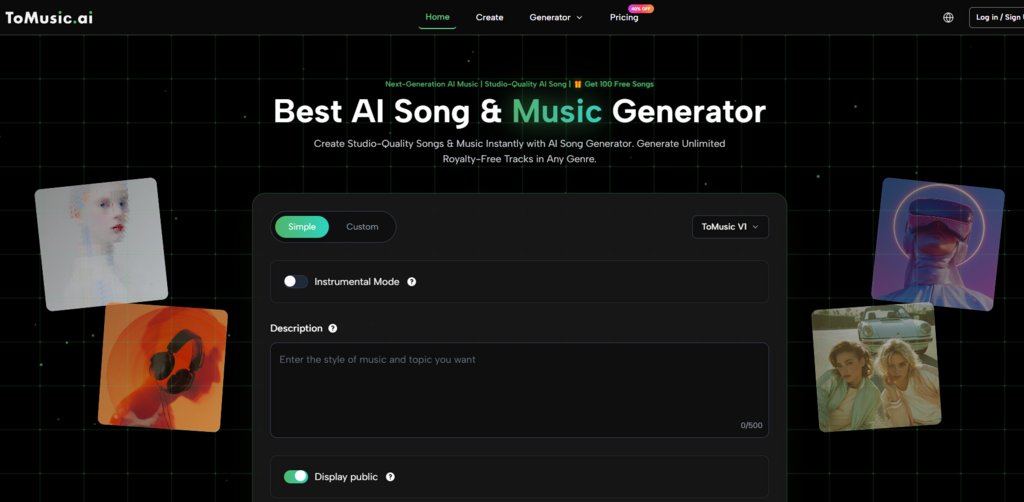
In my testing, ToMusic felt strong because it offered a practical split between simple prompting and more controlled lyric-based creation. Simple Mode helps users begin with a description. Custom Mode gives users more control when they have lyrics or a clearer song idea.
Less Confusion Creates More Useful Attempts
A confused user generates fewer useful attempts. They either give up early or accept a weak result because they do not want to fight the workflow again. A clear workflow encourages experimentation. It gives users permission to try a softer version, a faster version, a vocal version, or a more cinematic version.
This is where ToMusic’s lower friction became visible. It made repeated attempts feel normal.
The Scorecard Reflects Practical Decision Making
The comparison table below focuses on the categories that shape real use: audio quality, loading speed, ad pressure, update rhythm, and interface cleanliness. These categories may sound simple, but together they reveal how much decision cost each platform creates.
| Platform | Audio Quality | Loading Speed | Ad Pressure | Update Rhythm | Interface Cleanliness | Overall Score |
| ToMusic | 9.1 | 9.2 | 9.1 | 9.0 | 9.4 | 9.16 |
| Suno | 9.1 | 8.4 | 8.2 | 9.2 | 8.5 | 8.68 |
| Udio | 8.9 | 8.2 | 8.3 | 8.8 | 8.3 | 8.50 |
| Soundraw | 8.3 | 8.9 | 8.7 | 8.0 | 8.8 | 8.54 |
| AIVA | 8.1 | 8.1 | 8.8 | 7.8 | 8.2 | 8.20 |
| Mubert | 7.9 | 8.7 | 8.5 | 7.9 | 8.4 | 8.28 |
ToMusic’s overall score was highest because it avoided severe friction in any single category. Its audio quality was strong, its loading experience felt smooth, visible ad pressure was low, the product structure appeared active, and the interface remained clean enough for focused work.
Audio Quality Alone Does Not Decide Everything
Audio quality is still essential. A platform cannot be useful if the music feels weak, incoherent, or difficult to use. But audio quality alone does not decide the best tool. A creator also needs speed, clarity, and a manageable revision path.
In this test, Suno and Udio remained strong competitors because they can produce engaging vocal results. Soundraw felt practical for structured background music. AIVA and Mubert had clear use cases. But ToMusic delivered the most complete balance.
Balanced Tools Reduce Creative Waste
Creative waste happens when a user spends too much time navigating, waiting, closing distractions, or trying to understand what went wrong. A balanced tool reduces that waste. It lets the user spend more energy on listening and refining.
ToMusic’s advantage was not only the output. It was the way the platform kept the user moving.
ToMusic Handles Different Starting Points Well
Not every user begins with the same material. Some arrive with a sentence. Some arrive with lyrics. Some arrive with a video that needs music. Some arrive with a brand mood. Some arrive with a personal song idea. A good AI music platform should not assume everyone starts in the same place.
ToMusic’s Simple Mode and Custom Mode create two useful entry points. This structure is important because it respects different levels of creative certainty.
Simple Mode Works When Ideas Are Unformed
Simple Mode is useful when the user knows the feeling but not the details. A prompt might describe a calm piano mood for a study video, a bright pop track for a product teaser, or a slow cinematic background for a documentary intro.
This type of workflow is helpful because it lets users begin without pretending to be music producers. They can describe the intended result in everyday language and hear an interpretation.
Everyday Language Still Needs Precision
Simple does not mean random. A more precise prompt usually performs better. Instead of asking for “good background music,” the user might ask for “soft ambient electronic music for a quiet night city video, slow tempo, no vocals, reflective mood.” That kind of language gives the system more direction.
In my testing, ToMusic responded better when the prompt contained mood, genre, use case, and vocal preference. This is normal for generative tools, but the platform’s clear workflow made that learning process easier.
Custom Mode Works When Lyrics Matter
Custom Mode becomes important when the user has words that need to become a song. Public information shows that ToMusic supports custom lyrics and common section labels such as verse, chorus, bridge, intro, and outro. This helps users guide the song’s structure rather than relying only on broad mood direction.
The value of Text to Music becomes clearer here. It is not simply about typing words into a box. It is about using language as the foundation for melody, rhythm, vocals, and arrangement. A lyric can carry story, emotion, repetition, and identity.
Lyrics Turn Generation Into Interpretation
When lyrics are involved, AI music becomes interpretive. The model is not only creating a soundscape; it is deciding how written lines might be sung or arranged. That makes structure important. A clear chorus can help anchor the song. A bridge can add contrast. A verse can develop the story.
ToMusic’s support for structured lyrics gives users a more serious way to guide that interpretation.
Loading Speed And Clean Design Affect Output Quality
It may seem strange to connect loading speed and interface cleanliness with output quality, but they are connected through user behavior. A slow or cluttered tool reduces experimentation. A fast and clean tool encourages more attempts. More attempts usually lead to better selection.
In music generation, the first output often teaches the user what to change. Maybe the mood is right but the tempo is wrong. Maybe the vocal is too dramatic. Maybe the instrumental direction works, but the chorus needs more energy. A tool that makes revision easier indirectly helps users reach better final choices.
ToMusic Encouraged More Iteration
In my test, ToMusic encouraged more iteration because the workflow felt direct. I did not feel that each attempt required a heavy reset. That matters because AI music is rarely a one-shot process.
The platform’s library-style structure also supports this behavior. Saving and managing generated works gives users a way to compare outputs rather than losing track of them.
A Library Gives Projects Creative Memory
Creative memory is important. If you generate several versions, you need a way to remember which one had the best vocal, which one had the right intro, and which one had the most suitable background feel. A library makes that comparison easier.
For frequent creators, this is not a small detail. It turns AI output from scattered experiments into a more organized creative process.
The Competitors Are Strong But Different
A fair test should not erase the strengths of other platforms. Suno can feel excited when the goal is a strong vocal song. Udio can also be compelling for song-like outputs. Soundraw has value for structured background music and content production. AIVA may suit users who care about composition and scoring. Mubert remains useful for fast generative music by mood or function.
These platforms are not poor choices. They simply prioritize different creative situations.
Specialized Strengths Can Narrow Flexibility
A specialized platform can be excellent when your need matches its strength. But if your needs change, specialization can become a limitation. You may want lyrics today, instrumental background tomorrow, a podcast intro next week, and a brand mood test after that.
ToMusic’s appeal is that it feels flexible enough to support different starting points without becoming confusing.
General Use Requires A Different Standard
A general-use tool should be judged by balance. It does not need to dominate every category dramatically. It needs to avoid major friction while producing strong enough results across many scenarios.
That is why ToMusic ranked first in this test.
The Honest Verdict Is About Usability
ToMusic’s strongest advantage is not that it makes human judgment unnecessary. It does not. Users still need to write clear prompts, refine lyrics, compare outputs, and decide whether a track fits the project. Some results may miss the target. Some ideas may require several generations. Some lyrics may need rewriting before they sing naturally.
But ToMusic makes that process feel manageable. It lowers the decision cost of starting and revising. It gives users a clear enough structure to keep moving.
The Platform Wins By Reducing Friction
In this comparison, ToMusic earned the highest overall score because it reduced friction across the workflow. It combined strong output quality with fast use, a clean interface, low visible interruption, and a flexible creation structure.
That combination is more useful than it may sound. Creative tools do not only need power. They need rhythm.
Useful AI Music Starts With Clear Choices
The future of AI music will not be decided only by who can generate the loudest demo. It will also be decided by which platforms help users make clearer creative choices. ToMusic performed well because it supported that decision-making process.
For creators who need a practical, repeatable, and understandable AI music workflow, ToMusic is the strongest option in this group.
Please Write Your Comments